Workspace
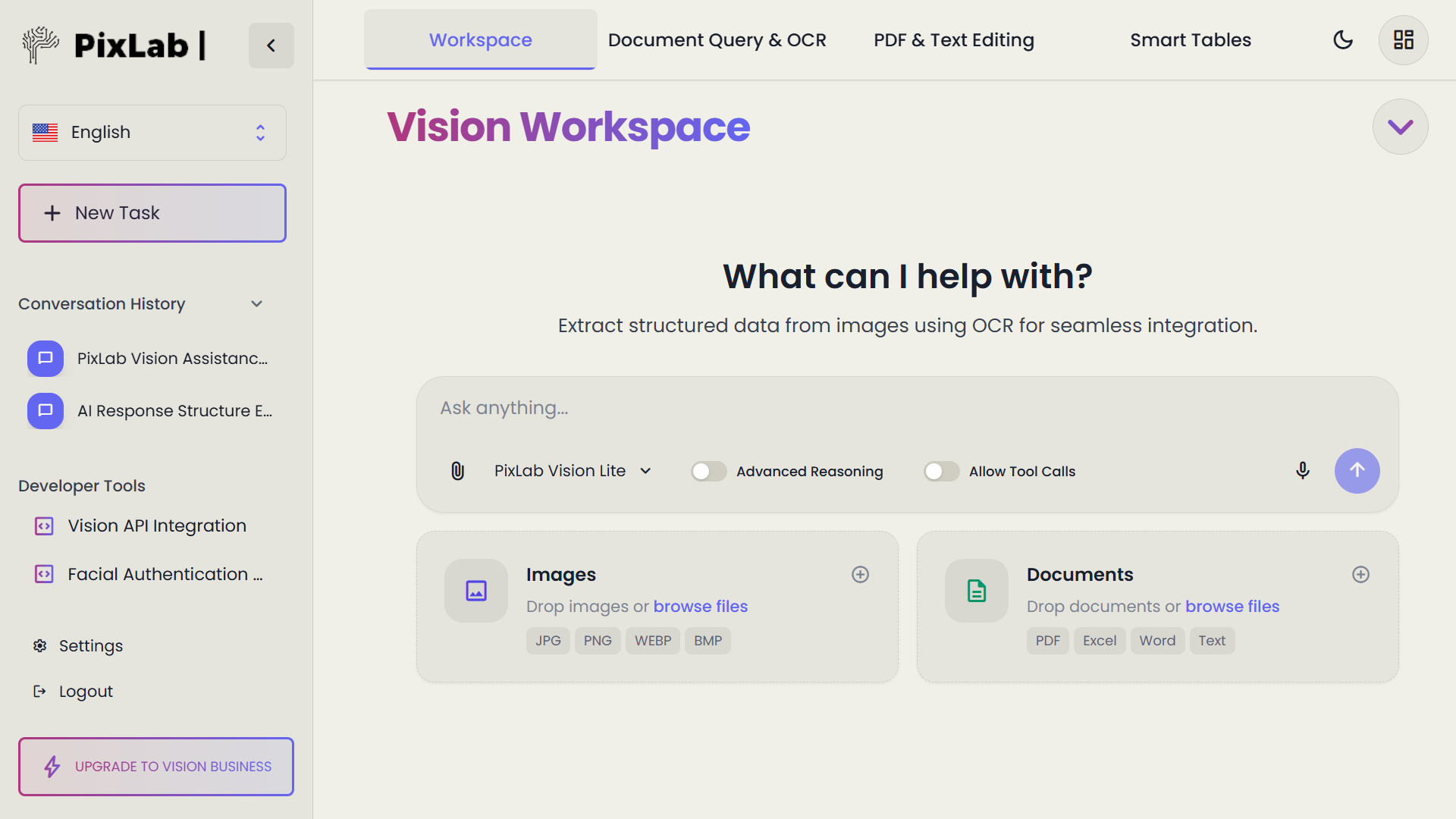
Your central session view. Upload images, PDFs, or documents, organize open files, and start any document task from one place.
Launch WorkspaceA browser-based environment for opening visual and document content, extracting text with OCR, asking natural-language questions, editing the result, and organizing structured information in Smart Tables.
Need the document intelligence to continue into a controlled desktop task? Connect the workflow with Think-Act.
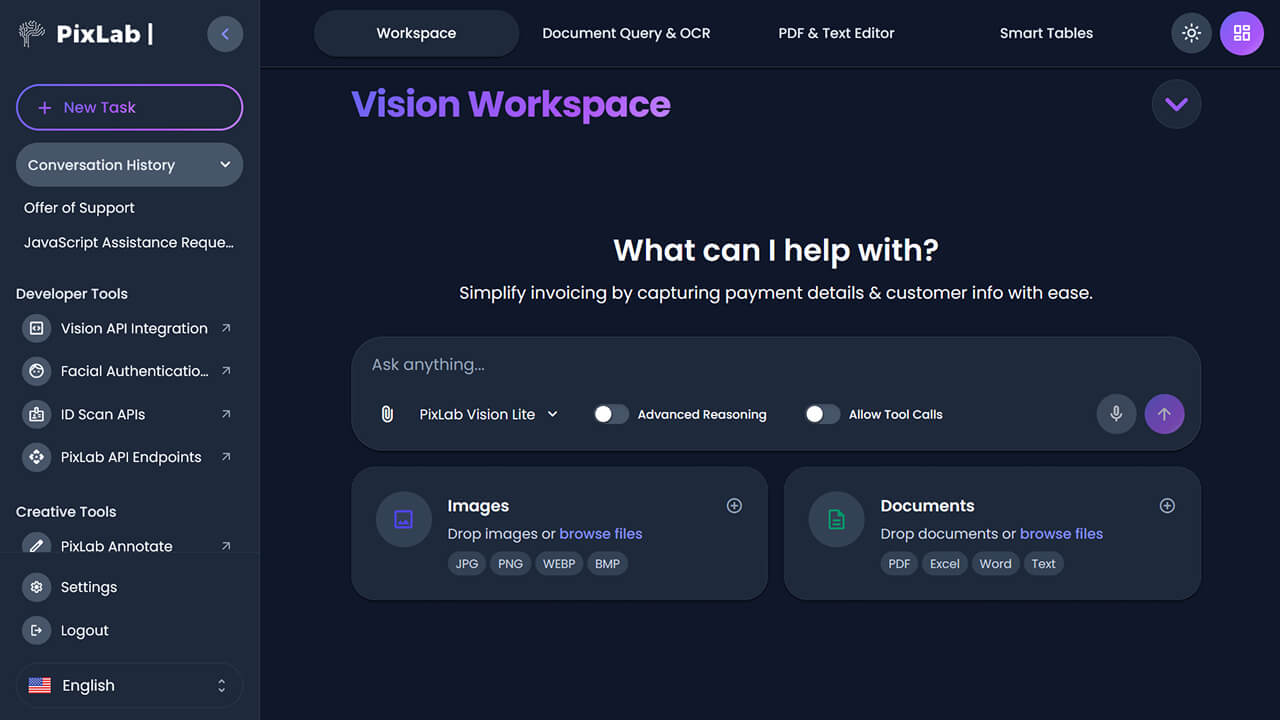
Vision Workspace organizes its tools into four connected areas. Choose the area that fits the task, or move between them as your work develops.
Your central session view. Upload images, PDFs, or documents, organize open files, and start any document task from one place.
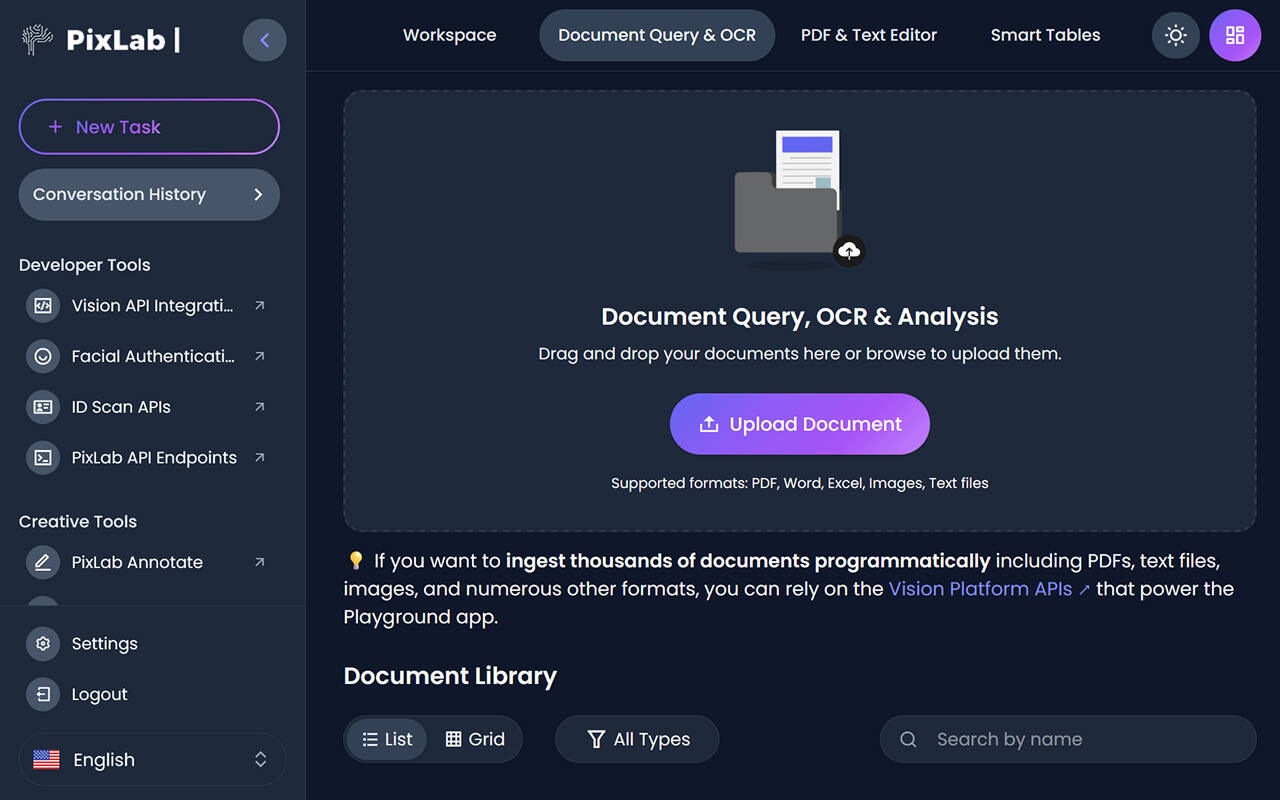
Launch WorkspaceExtract text from images, scans, and PDFs using OCR. Then ask natural-language questions to surface specific data, summaries, or field values.
Related Image Query APIEdit extracted text, write in Markdown, and refine AI-generated content. The editor keeps source documents and editable output in the same session.
Try the editorMove extracted fields, parsed values, and structured data into a spreadsheet-like table for review, formatting, or export without leaving the browser.
Related LLM Parse APIVision Workspace keeps your files and document tools in one browser environment. Move between Workspace, Document Query & OCR, PDF & Text Editor, and Smart Tables without switching applications.
Upload supported images and documents
The current interface accepts JPG, PNG, WEBP, and BMP images, plus PDF, Excel, Word, and text documents.
Review extracted content before using it
Use the query and editing areas to inspect OCR output, parsed fields, and generated text before copying or exporting a result.
Free and account options
The live Workspace currently presents free and premium model choices alongside PixLab account sign-in. Check vision.pixlab.io ↗ for current access requirements and usage limits.
Source
PDF · Image · Scan
Process
OCR · Query · Edit
Output
Text · Table · JSON
Vision Workspace connects OCR, document understanding, querying, editing, and structured output as one practical sequence. You can stop after any stage or continue into a developer or agentic workflow.
Input
PDF · JPG · PNG · WEBP · BMPOpen a PDF, image, or scan in the Workspace. No conversion step required. Your document appears in the viewer ready for processing.
Extraction
OCR APIOptical character recognition converts images, scans, and PDF content into readable, searchable text. The extracted result appears alongside the source document for comparison.
Query
Query APIUse the document query interface to surface specific values, field data, summaries, or comparisons from the uploaded content. Review the answer against the source before using it downstream.
Parsing
LLM Parse APIMove beyond plain text extraction. Structured parsing converts document content into JSON, Markdown, or organized fields — ready for downstream use, APIs, or export to Smart Tables.
Review & edit
Refine extracted or generated content in the text editor. Organize field data in Smart Tables. Continue manually, use related PixLab APIs in an application, or hand the structured output to a controlled agentic workflow in Think-Act.
Bring in
Extracted text
Refine
Edit · Transform
Finish
Copy · Export
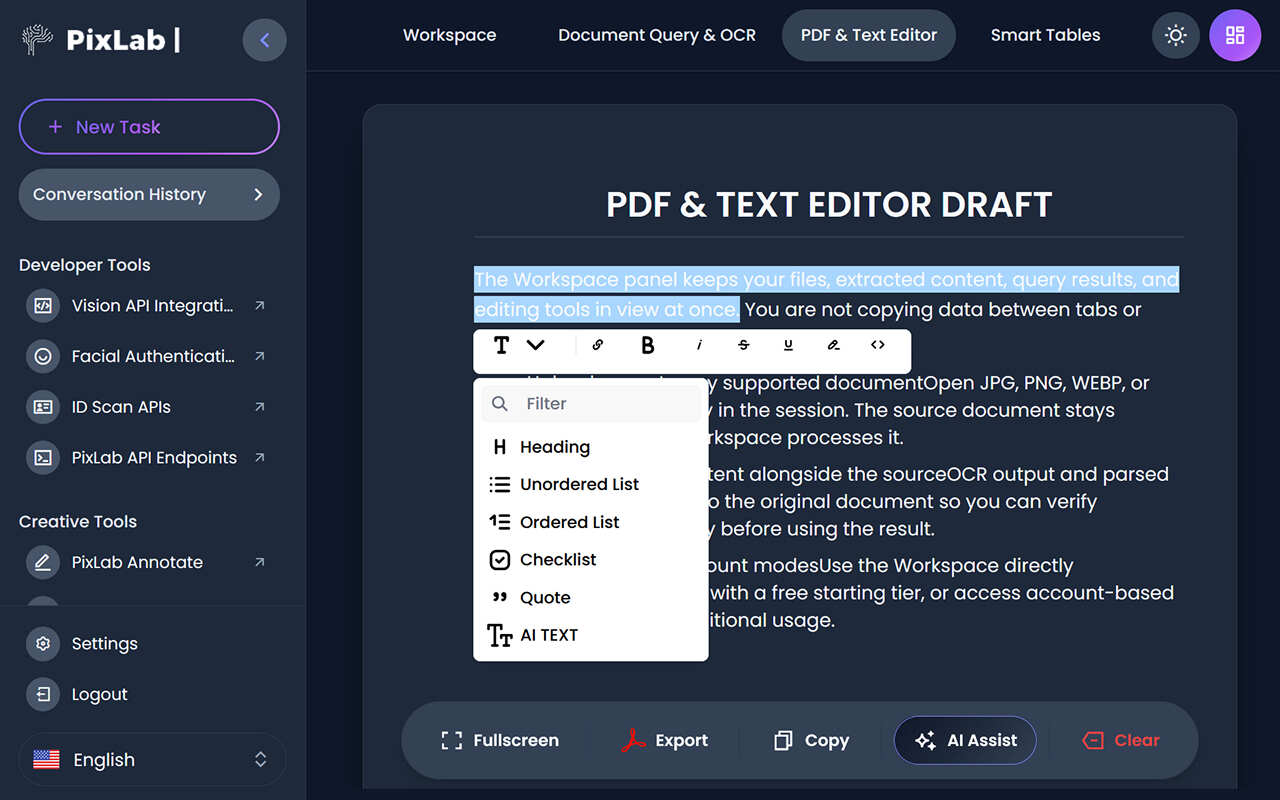
The editor closes the gap between understanding a document and producing usable text. Start a draft, bring across extracted or generated content, edit it manually, then use targeted AI assistance only where it helps.
Generate
Draft new text from an instruction.
Transform
Rewrite, summarize or change tone on selected text.
Review
Keep manual editing in the loop before export.
Export
Move the finished draft into the next tool or workflow.
Smart Tables give extracted or manually entered information a spreadsheet-style surface for review, cleanup, formulas, and export without moving the work into another tool.
Spreadsheet operations
Use familiar functions while cleaning or shaping extracted data.
AVG
ROUND
MIN
MAX
CONCAT
LEFT
Export choices
Use the Workspace export control after reviewing and preparing the table.
Review the current export options in the live Workspace and choose the format available for your next step.
A useful pattern: extract fields from a report or invoice, verify the values against the source, arrange them in a table, apply formulas where needed, then export the reviewed dataset.
Use Vision Workspace to review contracts, reconcile financial records, process forms, or explore a document task before building an integration.
Extract key terms, clauses, and dates from contracts and scanned agreements. Use document query to locate specific provisions without reading the entire document.
Parse invoices, receipts, and financial statements into structured field data. Move extracted values directly into Smart Tables for review and reconciliation.
Extract structured data from submitted forms and scanned documents. Use the editor to reformat and prepare content for records or downstream systems.
Use the browser Workspace to explore document tasks before building an integration. PixLab provides separate developer APIs for related OCR, image-query, parsing, and document-processing workflows.
The Workspace currently presents free and premium model choices, account sign-in, a document library, and links to the broader PixLab account environment. For current access requirements and usage limits, check the live Workspace; pricing and availability can change.
Vision Workspace exposes sign-in and account creation. The connected PixLab account environment provides API keys, usage data, and support controls.
The Workspace labels both free and premium model areas. Check the live product for current model availability, usage limits, and plan requirements.
The PixLab account environment includes an AWS S3 integration area for storage workflows. Check current documentation for scope and availability.
For regulated use cases, confirm current data handling and contractual requirements through PixLab's published policies or support channels before production use.
PixLab provides separate REST APIs for related developer workflows, including OCR, image query, structured document parsing, LLM tools, and identity-document scanning. Choose the endpoint whose documented inputs and outputs match your application.
/ocr
Extract text from supported images or video frames with optical character recognition
OCR API reference/query
Ask natural-language questions about an image and receive a grounded answer
Review Image Query API/llm-parse
Convert supported documents into LLM-ready Markdown, structured JSON, or plain text
LLM Parse API reference/docscan
Structured field extraction from supported identity documents via REST API
DocScan API referenceVision Workspace is where you inspect, query, extract, and edit document intelligence in the browser. Think-Act is PixLab's Windows desktop agent that extends that intelligence into controlled, bounded desktop workflows with explicit approval gates and reviewable results.
Vision Workspace
Think-Act Desktop
Find out what Vision Workspace supports, how to get started, and how it relates to Think-Act and the PixLab APIs. Can't find the answer you need? Contact support.
Vision Workspace is PixLab's browser-based environment for working with visual and document content. It includes OCR and document parsing, natural-language document queries, PDF and text editing, and Smart Tables for organizing extracted data — all accessible without installation.
The current Workspace interface lists JPG, PNG, WEBP, and BMP for images, and PDF, Excel, Word, and text files for documents. Check the live Workspace ↗ for the current complete list of supported inputs.
Vision Workspace can be opened without installation and currently presents a free model option alongside account sign-in and creation controls. Whether a particular task requires an account, and the applicable usage limits, can change; check the live Workspace ↗ for current access details.
In the Document Query & OCR area, upload a supported file and use natural-language prompts to query, summarize, and explore its content. PixLab's separate /query developer endpoint is documented for asking questions about a submitted image, so its behavior should not be assumed identical to the browser workflow.
Vision Workspace ↗ is a browser-based environment for interactive document work: OCR, extraction, querying, editing, and organizing content. Think-Act is PixLab's Windows desktop AI agent for controlled, reviewable multi-step workflows that can span tools and applications. The two products are connected but serve different modes of work.
PixLab provides separate developer APIs for related workflows: /ocr for supported images or video frames, /query for image questions and answers, /llm-parse for supported documents, and
DocScan for supported identity documents. These APIs can be used independently; do not assume an individual endpoint behaves identically to Vision Workspace. Start with the VLM API reference hub or explore LLM and parsing APIs.
Start with Vision Workspace
Upload an image or PDF, run OCR, ask a question about its content, and review the result. Because the Workspace runs in the browser, there is nothing to install or configure. Start with one practical document task and build from there.